
From 4 hours to 30 minutes — Building an Automated AI Evaluation System
I built an open-source automated evaluation system for my RAG Chatbot using DeepEval and MLflow, reducing the evaluation cycle from 4 hours to 30 minutes while catching quality issues that manual testing missed.
Background
I’d been working on my RAG Chatbot for a while as a side project, fixing things and vibe-checking they worked. But I soon realized this approach would only get me so far, as by fixing something I was breaking something somewhere else. Then an email would arrive from my inference provider telling me they’re deprecating the model I’m using.
Both cases (and many others) called for a full rerun of the evaluation suite.
Challenge
I had gone through the process of defining manual evals, to be able to evaluate the system’s overall performance in relevant areas, but the problem was, running these evals after every single test took a couple hours, became very tedious and error prone. And on top of that came the analysis work: comparing the new results to those of the previous version, which also took around 2 hours.
Too much work for something you need to do for absolutely every change: I needed an Automated AI Evaluation System. And it had to be open source.
The Approach
Context
In my Automation Guild 2026 talk “Practical QA for AI Chatbots” I outlined an evaluation framework that consisted of four steps:
- Define the scope of your eval test suite
- Write some manual evals
- Establish a baseline
- Systematically compare results against the baseline after every change This Automated AI Evaluation System was built as a continuation of the first two steps, as the metrics around answer quality were already defined (grounding, completeness and reasoning) and evals were already written.
The Evaluation Library
I went for Deepeval for an eval library as it provided the flexibility I needed to define metrics that resembled those defined for manual evals. Ragas was also a candidate, but they favored more pre-built RAG-centric metrics that were focused on the two phases of the RAG pipeline (retrieval and augmentation) which didn’t match my use case. A variable to control how many Deepeval workers to spawn for concurrency was added, to shorten the execution time and account for inference provider rate limits.
Observability
Deepeval offers a seamless integration with ConfidentAI, an observability platform. It can be enabled by just running one command, but I wanted to keep it open source and have complete control about what to track. After some analysis MLflow was the stronger candidate: it had the exact level of abstraction needed — no need to go into the infra/db layer — but completely free to log whatever: app, eval parameters and test results.
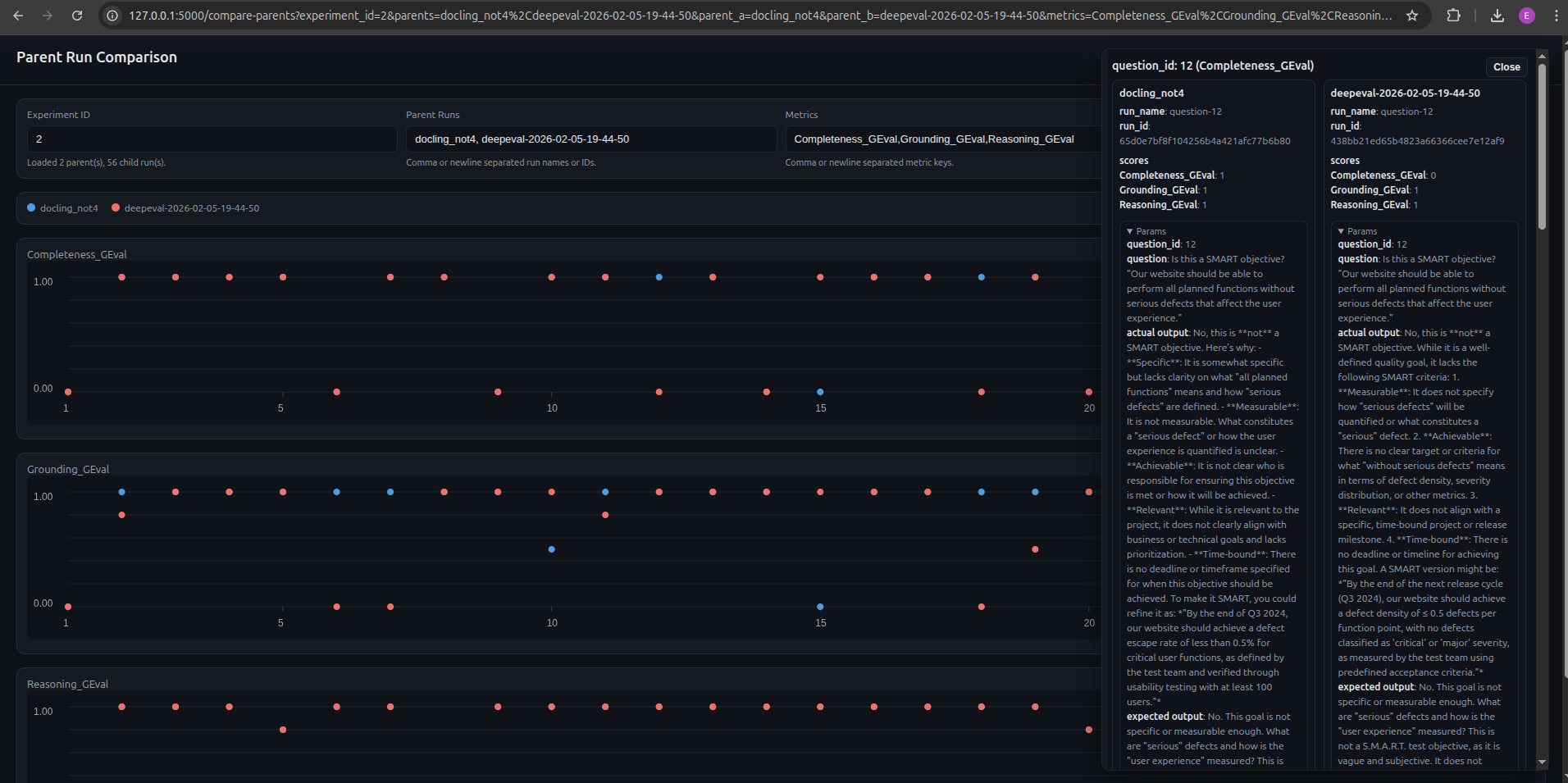
While MLflow was a really good addition, there was no way to easily compare full evaluation runs without a lot of navigating back and forth. To remove this friction, I needed a side by side comparison which arguably became the most useful feature in the AI Evaluation System allowing me to see the impact of a change at a glance. In order to enable this:
- Parent / child run approach was used in which every pytest execution created a parent run and each of the evals ran was a child run.
- Extended MLflow with a side-by-side comparison page. The user enters parent runs and metrics, clicks load, and all child run results are visualized. Clicking on particular evals loads all relevant information.
Test Definition as Code
One of the most challenging parts of this work was to write the prompts for the metrics. There are so many implicit assumptions when we human-grade an eval, that codifying that into a prompt is extremely hard.
Same happens with the Golden Sample. As much as we expect it not to change, there are occasions in which the prompt is overly vague or it simply does not belong in the current evaluation suite (e.g. mathematical calculation cannot be scored for Grounding).
Since these definitions are a fundamental part of the Evaluation System, I’m tracking and versioning the golden sample and all metric definitions. This also enables the possibility of rerunning a specific past version.
Decoupling the Inference Providers
When it comes to inference, running the application in production has very different requirements from those for evals. While for production you want something reasonably accurate and safe, you also need quick response times, relatively low token limit and temperature. In evals, accuracy is of utmost priority, but also instruction following, and formatting (JSON). For this reason, the inference configuration for the application and the Evaluation System was fully decoupled using a full set of variables. This enables the user to run a cheap and fast model for production and a stronger one for evals.
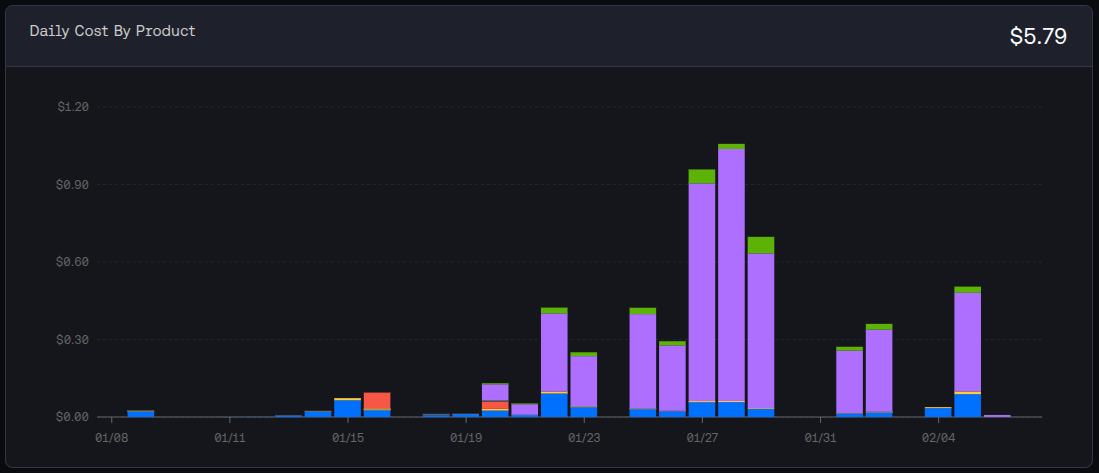
In this particular system, I generally run Mistral-7B-Instruct-v0.3 for production and Meta-Llama-3.1–70B-Instruct-Turbo for evals. As of Feb 19 2026, the prices for million tokens (input/output) were the following: $0.20 for Mistral and $0.88 for Llama.
Results & Impact
Time Savings
This gain is twofold: at execution time and when analyzing results.
Running the 28 evals took around 2 hours to run, annotate and grade results, while the framework runs them in around 90 seconds. These numbers depend largely on your inference provider and rate limits.
Analyzing results is a very tedious process with manual evals: open two tabs compare the score for each of the evals, check what the actual response is, what the reason for the score is… With the side-by-side comparison page, this can be done at a glance and for several runs, saving a significant amount of time.
In a nutshell we went from a 4 hour process (2 hours execution and logging + 2 hours of analysis) to a 30 minute process (90 seconds for execution and 30 minutes for analysis).
Removing the Human from the Loop (when not needed)
The beauty of this Evaluation System lies in the fact that the human is as removed from the process as possible. This ensures results are thorough: I’ve seen a case in which I marked an eval as passing in all three metrics, while the automated one was failing on Grounding. The reason: the app was using pre-trained knowledge and not retrieved context, thus the answer was ungrounded (ungrounded correctness).
When running manual evals and annotating results, there’s a practical limit to what you can track (as every field you add requires extra effort to fill in). Additionally, there’s always a human component that might vary in terms of thoroughness when documenting test execution. This Evaluation System ensures there’s a consistency in the logging of the test runs, all parameters will be tracked for every run.
Model Selection
With this Evaluation System, you can swap out the model, have results in a matter of minutes and make data-driven decisions by simply looking at a comparison page.
Through this process I was able to experiment with some candidates. I found that Mistral was quite on point from the start, but when looking into evals I knew I needed something powerful for evals. Surprisingly, some flagship models like DeepSeek-R1 were excluded due to high prompt variance, sometimes printing lines of code as a response. Meta-Llama-3.1–70B-Instruct-Turbo seemed to provide good consistent results.
Thorough Metric Definition
We arrived at clear, aligned metric definition as required by the llm-as-a-judge. Having them as an artifact also ensures consistency and reproducibility, with the added benefit that these metric definitions are reusable for future projects or transferable to other AI applications.
Key Takeaways
Failure Modes can have different sources
The app can fail, the evals can fail, and both can fail at the same time. The latter are the hardest to catch. A specific example:
- The eval prompt: “I found an issue that the developers cannot fix in this sprint, should I open a defect report?”
- Expected answer: “Yes, it’s recommended to create a defect report if the defect cannot be fixed in the same iteration.”
- Actual answer: “Yes, you should open a defect report for the issue as it cannot be resolved within the same sprint and it blocks other current sprint activities.”
- Human review: the problematic part is the hallucination “it blocks other current sprint activities”. The app hallucinated and the reasoning metric did not catch it. These types of issues trigger a ticket for the app as well as the eval code.
Start with a limited number of evals
This allows you to start simple and work on the infrastructure and framework early, helping you define what parameters you want to track and what tools suit your needs. Starting small also reduces the work on the hardest part: metric definition.
Metric definition is trickier than it sounds
There are so many implicit assumptions when a human grades that encoding those into a prompt is not straightforward, so make sure you spend enough time here.
Do spot checks on automated vs human-graded evals from time to time to account for changes to the application or the evals and make sure results are still in sync.
Framework requirement gathering comes first
Conclusion
Building an AI Evaluation framework is very different from building a traditional test automation framework. The nature of the system is completely different and you’re constantly checking if your tests still work.
Looking ahead, I’d like to explore extending the framework to cover performance evaluation (token count, cost calculation, response times…) and agent-specific testing (resolution path, tool usage efficiency). The architecture is flexible enough to support these: it’s a matter of defining the right metrics and plugging them in.
If you want some inspiration, check out the repo: https://github.com/eliaspardo/rag-chatbot I took a very iterative approach which required lots of rework and re-running test runs. I would recommend gathering requirements for the eval framework as soon as possible, it’ll save you time down the line.